Free Calendar Maker for Printable PDFs
Make a monthly or yearly calendar in your browser and download it as a print-ready PDF. Pick from 16 templates, add your events, and print. No account needed.
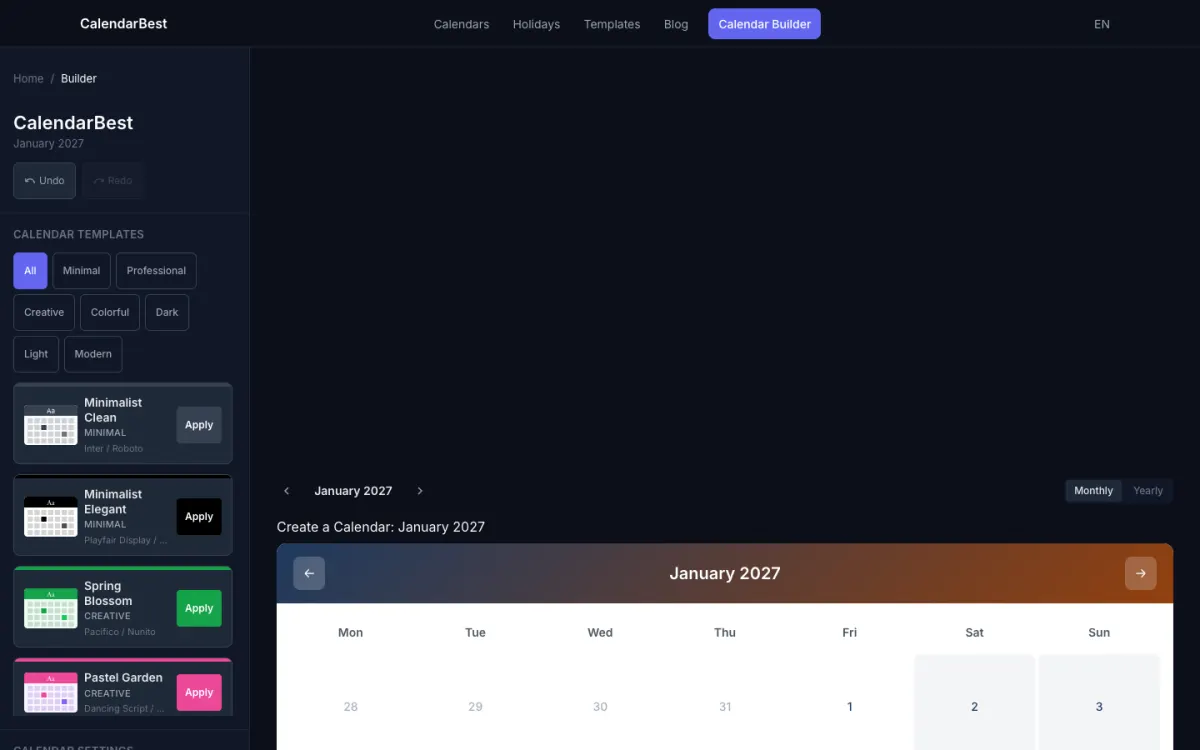
How to Make a Calendar Online in 4 Steps
Making a printable calendar takes about a minute. There is nothing to install and nothing to sign up for.
Open the Builder
Open the calendar builder. It runs in your browser, and your design is saved on your device as you work.
Choose a Theme
Start from one of 16 templates, or set your own colors and heading and date fonts.
Add Events & Notes
Click any date to add a color-coded event or a note. Turn on public holidays for one of 11 countries.
Export to PDF
Choose a month, a 12-page year or a one-page year, pick A4, Letter or A3, and download the PDF.
Which Public Holidays Are Built In?
The builder can show public holidays for the United States, the United Kingdom, Canada, Australia, Germany, Switzerland, France, Japan, China, India and Brazil, in the grid and in the PDF. Check the dates in the public holidays by country, or open the printable yearly calendar to see every month at a glance.
What Calendar PDF Sizes Can You Download?
Export the current month, a 12-page year that starts in any month, or the whole year on a single page. Paper sizes are A4 and A3 from the ISO 216 standard and US Letter, each in portrait or landscape.
Calendar Templates for Every Style
There are 16 templates in 12 categories, from minimalist and business layouts to floral, vintage and seasonal themes. Every template is a starting point: change any color or font before you export.
Customize Calendar Colors and Fonts
Start from a template or from scratch, then set the primary, secondary, background and text colors and separate fonts for headings and dates. Browse the free printable calendar templates to find a starting point.
Yearly calendar view
See all 12 months on one screen, then export the year as 12 pages or as a single page.
Week numbers and holidays
Start weeks on Monday or Sunday, show ISO week numbers and shade weekends.
Add Events and Notes to Any Date
Mark important dates with color-coded events and add notes to any day. Everything is saved in your browser, so there is no account to create.
Download a Print-Ready PDF
The PDF is generated on your device, with the template fonts embedded, so it prints the way it looks on screen.
No sign-up
Start designing immediately. No email, no password, no trial.
Free forever
Every feature is included. There are no premium tiers and no watermark.
Frequently Asked Questions
Yes, you can print and export calendars without signing up. Simply visit the calendar builder, create your design, and export it as a PDF — no account required.
Open the CalendarBest calendar builder, choose one of 16 templates or set your own colors and fonts, and click any date to add events or notes. Then choose the month or year to export, pick A4, Letter or A3, and download the PDF. No signup is required.
Simply visit the calendar builder, customize your theme and colors, add events or notes to dates, and click the export button to download your PDF. No signup required.
No, CalendarBest is completely free to use without registration. Your calendar designs are stored locally in your browser.
Yes, CalendarBest is 100% free forever. All features are included with no premium tiers or hidden costs.
CalendarBest exports PDF files. You can choose A4, Letter or A3 paper in portrait or landscape, and export one month, a 12-page year or the whole year on one page.
Yes. Start from one of 16 templates, then change the primary, secondary, background and text colors and the heading and date fonts.
In the calendar builder, simply click on any date to open a modal. Switch to the "Event" tab, enter a title, optionally add a description, choose a color from the palette, and click "Add Event". Your event appears as a colored dot on that date. You can edit or delete events by clicking the date again.
The best calendar for planning depends on your needs. For annual overview and goal setting, a yearly calendar view helps you see the big picture. For detailed scheduling and event tracking, a monthly calendar with customizable events works best. CalendarBest offers both views — switch between yearly and monthly layouts, add color-coded events, and export your planning as a high-quality PDF to keep on hand.
To make a yearly calendar, open the CalendarBest builder and select "Entire Year" from the export options. This generates a 12-page PDF with all months. Choose your paper size (A4, Letter, or A3) and orientation, then click "Download PDF" to export. For a quick yearly overview without events, visit /calendar/[year] to see all 12 months at once with holidays and observances marked.