---
title: "How to Print a Calendar: Step-by-Step Guide | CalendarBest"
description: "How to print a calendar at home: export a free PDF in A4, Letter or A3, choose the right paper and printer settings, and fix faded colors. No signup needed."
canonical_url: "https://calendarbest.com/blog/how-to-print-calendar-at-home"
last_updated: 2026-10-28
locale: en
meta:
"og:description": "How to print a calendar at home: export a free PDF in A4, Letter or A3, choose the right paper and printer settings, and fix faded colors. No signup needed."
"og:image": "https://calendarbest.com/og-image.png"
"og:image:height": "630"
"og:image:type": image/png
"og:image:width": "1200"
"og:title": "How to Print a Calendar at Home: Paper, Settings and Fixes"
"twitter:description": "How to print a calendar at home: export a free PDF in A4, Letter or A3, choose the right paper and printer settings, and fix faded colors. No signup needed."
"twitter:image": "https://calendarbest.com/og-image.png"
"twitter:title": "How to Print a Calendar at Home: Paper, Settings and Fixes"
---
> Index of every page on this site: [llms.txt](https://calendarbest.com/llms.txt)
[**Tutorials**](https://calendarbest.com/blog)
# **How to Print a Calendar at Home: Paper, Settings and Fixes**
How to print a calendar at home: export a free PDF in A4, Letter or A3, choose the right paper and printer settings, and fix faded colors. No signup needed.
June 8, 20266 min readBy CalendarBest Team
printinghome printingtutorialpdf exportpaper size
To print a calendar at home, export it as a PDF at your printer's paper size, print one test page at actual size, then print the final copy on cardstock with the print quality set to High. That is how to print a calendar in short; the steps below cover the settings and paper choices that decide whether it comes out sharp or flat.
We built CalendarBest so the design and PDF part happens in your browser, free and without an account. If you only need a blank year, the [printable 2027 calendar](https://calendarbest.com/calendar/2027) page is ready as it is. For a custom design, start with Step 1.
## **What do you need to print a calendar at home?**
- A calendar PDF (Step 1 and Step 2 show how to make one)
- An inkjet or laser printer that takes your paper size
- Plain copy paper for the test print
- Cardstock or heavier paper for the final copy
- Optional: a hole punch, binder clips, a frame or a binding machine
## **Step 1: Design your calendar in the builder**
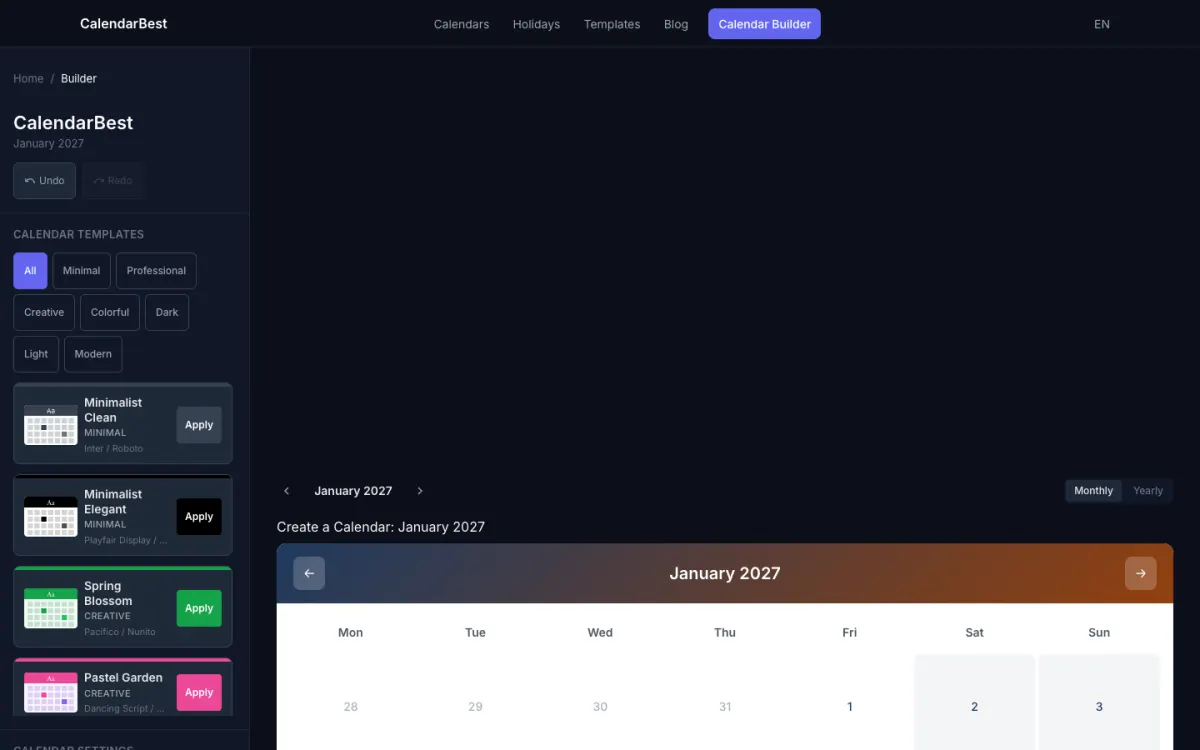
Open the [free calendar builder](https://calendarbest.com/builder) and pick a starting design from the template gallery, or browse the [printable monthly calendar templates](https://calendarbest.com/templates/monthly) first. Use the monthly view for one month per page or the yearly view to see all 12 months at once.
Click any date to add color-coded events and notes. Under [Holidays](https://calendarbest.com/holidays), pick your country and its public holidays appear in the grid and in the PDF. We cover 11 countries, including the US, UK, Canada and Australia.
### **Pick colors that print well**
A printer cannot match every color your screen shows. Dark primary colors on a light background print the most reliably, while bright neons usually come out duller on paper. Our guide to [color-coded calendars](https://calendarbest.com/blog/color-theory-for-calendars) explains how to build a palette that stays readable.
### **Choose a font that prints as you see it**
Inter, Playfair Display, Nunito and Roboto are embedded in every exported PDF, so they print exactly as the preview shows them. If the typography matters to you, use Inter, Roboto or Nunito from the font menu, or start from a template that uses Playfair Display.
## **Step 2: Export the PDF at the right paper size**
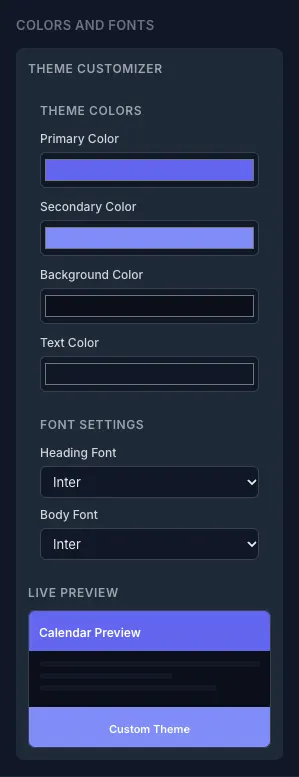
Open the export panel and choose what to print: the current month, the entire year as 12 pages starting in any month, or the whole year on one page. Then choose paper size and orientation.
- **A4 (210 x 297 mm)**: the standard outside North America, defined in [ISO 216](https://en.wikipedia.org/wiki/ISO_216)
- **US Letter (8.5 x 11 in)**: the standard in the US and Canada
- **A3 (297 x 420 mm)**: twice the area of A4, good for wall calendars, but your printer must take A3
Landscape gives wider day cells, which suits a monthly grid on a wall. Portrait fits a clipboard or a narrow spot next to a door. Our guide to [calendar paper sizes](https://calendarbest.com/blog/printable-calendars-everything-you-need-to-know) compares the formats in more detail.
## **Step 3: Choose the right paper**
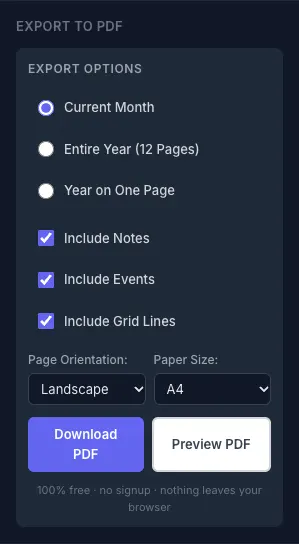
Paper decides how the calendar feels and how long it lasts. Match it to how the calendar will be used.
- **Copy paper (20 lb, about 75 gsm)**: fine for drafts and test prints, but thin and easy to crease
- **Cardstock (65 to 80 lb cover, about 175 to 215 gsm)**: the best all-round choice for a wall or desk calendar you handle every day
- **Matte photo paper**: richer colors and still easy to write on
- **Glossy photo paper**: the most vivid colors, but most pens smear on it, so keep it for gift calendars
Check your printer's manual for the heaviest paper it accepts. Many home printers handle cardstock better through a rear or manual feed slot.
### **Which paper weight is best for a wall calendar?**
For a calendar that hangs for a month and gets written on, cardstock around 65 to 80 lb cover is the practical choice. It stays flat on the wall, takes ink without bleeding and survives being flipped twelve times.
## **Step 4: Prepare your printer**
Check ink or toner levels before you start, because running out halfway through a 12-page year wastes paper. If recent prints showed streaks, run the head cleaning cycle from your printer's maintenance menu.
Load the paper straight, with the guides touching the edges without bending them. Don't overfill the tray, and fan the sheets first so they feed one at a time.
## **Step 5: Set up the print dialog**
Open the PDF and go to Print. These settings matter most:
1. **Scale**: choose Actual size or 100% when the paper matches the PDF. Choose Fit to page if you print an A4 PDF on Letter paper or an A3 PDF on Tabloid.
2. **Paper type**: match it to what is loaded (plain, cardstock or heavy paper, photo). The wrong setting causes smearing and faded color.
3. **Quality**: High or Best. Draft and Fast modes save ink but print grainy grids.
4. **Color management**: turn it on if your printer offers it, so on-screen colors translate more closely.
5. **Two-sided printing**: useful for a bound 12-page year; skip it for sheets you hang on a wall.
## **Step 6: Print one test page first**
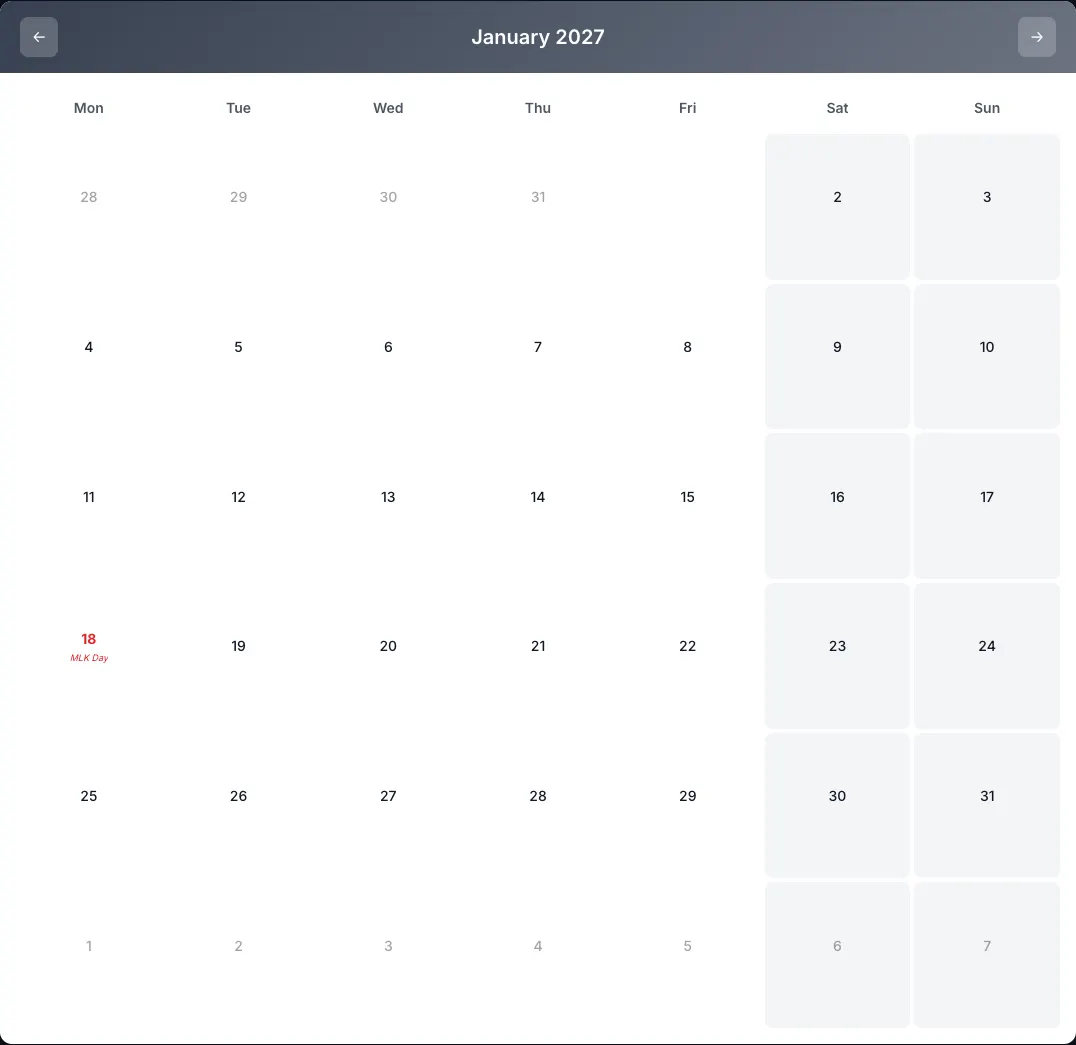
Print the busiest month, the one with the most events and colors, on plain copy paper. Look at it from where you will actually read the calendar, usually arm's length.
Check that day numbers are crisp, event colors are easy to tell apart and the grid isn't cut off at the edges. If something is wrong, fix the setting and test again before you load cardstock.
## **Step 7: Print the full calendar and finish it**
Load your final paper and print all pages. Take each sheet out as it lands and let it dry face up before stacking, especially on cardstock or photo paper.
Then finish it the way you will use it:
- **Hanging**: punch one hole at the top center, or use a binder clip on a nail
- **Binding**: spiral, comb or ring binding turns 12 pages into a flip calendar
- **Framing**: a frame protects a one-page year calendar on the wall
- **Lamination**: makes a page last, but ballpoint pens no longer write on it
## **Why do printed colors look different from the screen?**
Screens mix red, green and blue light (RGB), while printers lay down cyan, magenta, yellow and black ink, known as the [CMYK color model](https://en.wikipedia.org/wiki/CMYK_color_model). Some bright screen colors have no exact ink equivalent, so they print slightly duller.
You can't remove that gap completely. A test print on your real paper shows exactly how your theme colors come out, and darker, less saturated shades travel best from screen to paper.
## **How do you fix common calendar printing problems?**
### **Faded or dull colors**
Check ink levels and set the paper type to the paper actually loaded. Paper made for inkjet printing absorbs ink more evenly than generic copy paper.
### **Smudging or ink bleeding**
This is almost always a paper-type mismatch or stacking too soon. Choose the cardstock or heavy paper setting and give each page time to dry.
### **Grid cut off or misaligned**
Switch the scale to Fit to page if the PDF and paper sizes differ. If the grid sits crooked, reload the paper squarely or feed a single sheet manually.
### **Blurry text or lines**
Make sure the PDF isn't shrunk to a small custom scale and that quality isn't set to Draft. Banding or streaks point to clogged print heads, so run a cleaning cycle.
## **When is a print shop the better choice?**
Home printing covers most calendars up to A3. A local print shop makes sense for sizes larger than your printer takes, dozens of copies, or finishes like heavy coated stock and professional binding.
We don't offer a printing service, but the PDF you export from CalendarBest is a standard file any print shop can work with. Bring it on a USB stick or send it by email.
## **Frequently asked questions**
Design the calendar in a tool like the CalendarBest builder, export it as a PDF at your paper size, then open the PDF and print it at Actual size with the quality set to High. Print one test page on copy paper before the final run.
Cardstock around 65 to 80 lb cover (about 175 to 215 gsm) is the best all-round choice for wall and desk calendars. Use copy paper for test prints and glossy photo paper only for gift calendars you won't write on.
Export the PDF at the same paper size that is loaded in your printer and print at Actual size. If the sizes differ, for example an A4 PDF on Letter paper, choose Fit to page in the print dialog.
Yes. In the CalendarBest export panel choose the whole year on one page; A3 paper gives each month the most room. You can also export the entire year as 12 pages, one month per page.
Screens use RGB light while printers use CMYK ink, and some bright screen colors have no exact ink match. Darker, less saturated theme colors and the correct paper-type setting give the closest result.
[Back to Blog](https://calendarbest.com/blog)
## **You Might Also Like**
[**How to Make a Yearly Calendar (Step-by-Step, Free PDF)**
How to make a yearly calendar in 6 steps: pick a template, auto-mark holidays for 11 countries, add your dates and export a free PDF on A4, Letter or A3.Nov 15, 20254 min read](https://calendarbest.com/blog/how-to-create-yearly-calendar) [**How to Print a Calendar: Letter vs A4 vs Legal vs Tabloid, Scale and Margins**
Which paper size to export, why you should print at 100% instead of "fit to page", and what happens to the margins when the PDF and the paper do not match.Oct 27, 20266 min read](https://calendarbest.com/blog/how-to-print-a-calendar-paper-size-scale-margins) [**Calendar Paper Sizes and Printable Calendar Types Explained**
Calendar paper sizes compared: A4, US Letter and A3, which suits a wall, desk or fridge, and every printable calendar type. Export any of them free as a PDF.Dec 1, 20254 min read](https://calendarbest.com/blog/printable-calendars-everything-you-need-to-know)
## **Create your own calendar**
Design and export custom calendars in minutes. No account required.
[**Open Calendar Builder **](https://calendarbest.com/builder)
```json
{"@context":"https://schema.org","@type":"FAQPage","mainEntity":[{"@type":"Question","name":"How do I print a calendar from my computer?","acceptedAnswer":{"@type":"Answer","text":"Design the calendar in a tool like the CalendarBest builder, export it as a PDF at your paper size, then open the PDF and print it at Actual size with the quality set to High. Print one test page on copy paper before the final run."}},{"@type":"Question","name":"What paper is best for printing a calendar?","acceptedAnswer":{"@type":"Answer","text":"Cardstock around 65 to 80 lb cover (about 175 to 215 gsm) is the best all-round choice for wall and desk calendars. Use copy paper for test prints and glossy photo paper only for gift calendars you won't write on."}},{"@type":"Question","name":"How do I print a calendar without cutting off the edges?","acceptedAnswer":{"@type":"Answer","text":"Export the PDF at the same paper size that is loaded in your printer and print at Actual size. If the sizes differ, for example an A4 PDF on Letter paper, choose Fit to page in the print dialog."}},{"@type":"Question","name":"Can I print a whole year calendar on one page?","acceptedAnswer":{"@type":"Answer","text":"Yes. In the CalendarBest export panel choose the whole year on one page; A3 paper gives each month the most room. You can also export the entire year as 12 pages, one month per page."}},{"@type":"Question","name":"Why does my printed calendar look duller than on screen?","acceptedAnswer":{"@type":"Answer","text":"Screens use RGB light while printers use CMYK ink, and some bright screen colors have no exact ink match. Darker, less saturated theme colors and the correct paper-type setting give the closest result."}}]}
```
```json
{"@context":"https://schema.org","@type":"HowTo","name":"How to Print a Calendar at Home: Paper, Settings and Fixes","description":"How to print a calendar at home: export a free PDF in A4, Letter or A3, choose the right paper and printer settings, and fix faded colors. No signup needed.","step":[{"@type":"HowToStep","position":1,"name":"Design your calendar in the builder","text":"Open the free calendar builder and pick a starting design from the template gallery, or browse the printable monthly calendar templates first. Use the monthly view for one month per page or the yearly view to see all 12 months at once. Click any date to add color-coded events and notes. Under Holidays, pick your country and its public holidays appear in the grid and in the PDF. We cover 11 countries, including the US, UK, Canada and Australia. A printer cannot match every color your screen shows. Dark primary colors on a light background print the most reliably, while bright neons usually come out duller on paper. Our guide to color-coded calendars explains how to build a palette that stays readable. Inter, Playfair Display, Nunito and Roboto are embedded in every exported PDF, so they print exactly as the preview shows them. If the typography matters to you, use Inter, Roboto or Nunito from the font menu, or start from a template that uses Playfair Display.","url":"https://calendarbest.com/blog/how-to-print-calendar-at-home#step-1"},{"@type":"HowToStep","position":2,"name":"Export the PDF at the right paper size","text":"Open the export panel and choose what to print: the current month, the entire year as 12 pages starting in any month, or the whole year on one page. Then choose paper size and orientation. - A4 (210 x 297 mm): the standard outside North America, defined in ISO 216 - US Letter (8.5 x 11 in): the standard in the US and Canada - A3 (297 x 420 mm): twice the area of A4, good for wall calendars, but your printer must take A3 Landscape gives wider day cells, which suits a monthly grid on a wall. Portrait fits a clipboard or a narrow spot next to a door. Our guide to calendar paper sizes compares the formats in more detail.","url":"https://calendarbest.com/blog/how-to-print-calendar-at-home#step-2"},{"@type":"HowToStep","position":3,"name":"Choose the right paper","text":"Paper decides how the calendar feels and how long it lasts. Match it to how the calendar will be used. - Copy paper (20 lb, about 75 gsm): fine for drafts and test prints, but thin and easy to crease - Cardstock (65 to 80 lb cover, about 175 to 215 gsm): the best all-round choice for a wall or desk calendar you handle every day - Matte photo paper: richer colors and still easy to write on - Glossy photo paper: the most vivid colors, but most pens smear on it, so keep it for gift calendars Check your printer's manual for the heaviest paper it accepts. Many home printers handle cardstock better through a rear or manual feed slot. For a calendar that hangs for a month and gets written on, cardstock around 65 to 80 lb cover is the practical choice. It stays flat on the wall, takes ink without bleeding and survives being flipped twelve times.","url":"https://calendarbest.com/blog/how-to-print-calendar-at-home#step-3"},{"@type":"HowToStep","position":4,"name":"Prepare your printer","text":"Check ink or toner levels before you start, because running out halfway through a 12-page year wastes paper. If recent prints showed streaks, run the head cleaning cycle from your printer's maintenance menu. Load the paper straight, with the guides touching the edges without bending them. Don't overfill the tray, and fan the sheets first so they feed one at a time.","url":"https://calendarbest.com/blog/how-to-print-calendar-at-home#step-4"},{"@type":"HowToStep","position":5,"name":"Set up the print dialog","text":"Open the PDF and go to Print. These settings matter most: 1. Scale: choose Actual size or 100% when the paper matches the PDF. Choose Fit to page if you print an A4 PDF on Letter paper or an A3 PDF on Tabloid. 2. Paper type: match it to what is loaded (plain, cardstock or heavy paper, photo). The wrong setting causes smearing and faded color. 3. Quality: High or Best. Draft and Fast modes save ink but print grainy grids. 4. Color management: turn it on if your printer offers it, so on-screen colors translate more closely. 5. Two-sided printing: useful for a bound 12-page year; skip it for sheets you hang on a wall.","url":"https://calendarbest.com/blog/how-to-print-calendar-at-home#step-5"},{"@type":"HowToStep","position":6,"name":"Print one test page first","text":"Print the busiest month, the one with the most events and colors, on plain copy paper. Look at it from where you will actually read the calendar, usually arm's length. Check that day numbers are crisp, event colors are easy to tell apart and the grid isn't cut off at the edges. If something is wrong, fix the setting and test again before you load cardstock.","url":"https://calendarbest.com/blog/how-to-print-calendar-at-home#step-6"},{"@type":"HowToStep","position":7,"name":"Print the full calendar and finish it","text":"Load your final paper and print all pages. Take each sheet out as it lands and let it dry face up before stacking, especially on cardstock or photo paper. Then finish it the way you will use it: - Hanging: punch one hole at the top center, or use a binder clip on a nail - Binding: spiral, comb or ring binding turns 12 pages into a flip calendar - Framing: a frame protects a one-page year calendar on the wall - Lamination: makes a page last, but ballpoint pens no longer write on it","url":"https://calendarbest.com/blog/how-to-print-calendar-at-home#step-7"}]}
```
```json
{"@context":"https://schema.org","@graph":[{"@id":"https://calendarbest.com/#website","@type":"WebSite","description":"Free calendar-to-PDF generator with a visual builder. Design monthly or yearly calendar layouts and export high-quality PDFs.","inLanguage":"en","name":"CalendarBest","url":"https://calendarbest.com/","potentialAction":[{"@type":"SearchAction","target":{"@type":"EntryPoint","urlTemplate":"https://calendarbest.com/builder?q={search_term_string}"},"query-input":{"@type":"PropertyValueSpecification","valueRequired":true,"valueName":"search_term_string"}}],"publisher":{"@id":"https://calendarbest.com/#/schema/organization/1"},"workTranslation":[{"@id":"https://calendarbest.com/de#website"},{"@id":"https://calendarbest.com/fr#website"},{"@id":"https://calendarbest.com/es#website"},{"@id":"https://calendarbest.com/it#website"},{"@id":"https://calendarbest.com/pt#website"}]},{"@id":"https://calendarbest.com/blog/how-to-print-calendar-at-home#webpage","@type":"WebPage","dateModified":"2026-10-28","datePublished":"2026-06-08","description":"How to print a calendar at home: export a free PDF in A4, Letter or A3, choose the right paper and printer settings, and fix faded colors. No signup needed.","name":"How to Print a Calendar: Step-by-Step Guide","url":"https://calendarbest.com/blog/how-to-print-calendar-at-home","breadcrumb":{"@id":"https://calendarbest.com/blog/how-to-print-calendar-at-home#breadcrumb"},"isPartOf":{"@id":"https://calendarbest.com/#website"},"potentialAction":[{"@type":"ReadAction","target":["https://calendarbest.com/blog/how-to-print-calendar-at-home"]}],"primaryImageOfPage":{"@id":"https://calendarbest.com/#logo"}},{"@id":"https://calendarbest.com/#identity","@type":"Organization","description":"Free calendar-to-PDF generator with a visual builder. Design monthly or yearly calendar layouts and export high-quality PDFs.","name":"CalendarBest","url":"https://calendarbest.com","logo":{"@id":"https://calendarbest.com/#logo"}},{"@id":"https://calendarbest.com/blog/how-to-print-calendar-at-home#/schema/software-application/1","@type":"SoftwareApplication","applicationCategory":"DesignApplication","name":"CalendarBest","operatingSystem":"Web","offers":{"@type":"Offer","availability":"https://schema.org/InStock","price":0,"priceCurrency":"USD","priceValidUntil":"2027-12-30T00:00:00.000Z"}},{"@id":"https://calendarbest.com/blog/how-to-print-calendar-at-home#article","@type":"Article","dateModified":"2026-10-28","datePublished":"2026-06-08","description":"How to print a calendar at home: export a free PDF in A4, Letter or A3, choose the right paper and printer settings, and fix faded colors. No signup needed.","headline":"How to Print a Calendar at Home: Paper, Settings and Fixes","inLanguage":"en","thumbnailUrl":"https://calendarbest.com/og-image.png","author":{"@id":"https://calendarbest.com/#/schema/organization/1"},"image":{"@id":"https://calendarbest.com/#/schema/image/1"},"isPartOf":{"@id":"https://calendarbest.com/blog/how-to-print-calendar-at-home#webpage"},"mainEntityOfPage":{"@id":"https://calendarbest.com/blog/how-to-print-calendar-at-home#webpage"},"publisher":{"@id":"https://calendarbest.com/#identity"}},{"@id":"https://calendarbest.com/blog/how-to-print-calendar-at-home#breadcrumb","@type":"BreadcrumbList","itemListElement":[{"@type":"ListItem","name":"Home","item":"https://calendarbest.com","position":1},{"@type":"ListItem","name":"Blog","item":"https://calendarbest.com/blog","position":2},{"@type":"ListItem","name":"How to Print a Calendar at Home: Paper, Settings and Fixes","position":3}]},{"@id":"https://calendarbest.com/#/schema/organization/1","@type":"Organization","name":"CalendarBest Team","url":"https://calendarbest.com/about"},{"@id":"https://calendarbest.com/#logo","@type":"ImageObject","caption":"CalendarBest","contentUrl":"https://calendarbest.com/logo.png","inLanguage":"en","url":"https://calendarbest.com/logo.png"},{"@id":"https://calendarbest.com/#/schema/image/1","@type":"ImageObject","contentUrl":"https://calendarbest.com/og-image.png","inLanguage":"en","url":"https://calendarbest.com/og-image.png"}]}
```
## Sitemap
See the full [sitemap](https://calendarbest.com/sitemap.md) for all pages.