---
title: "Weekly Planning Guide: Time Blocking System | CalendarBest"
description: "Weekly planning made simple: a 30-minute routine, three priorities and time blocking, explained. Then plan each week on a free printable monthly calendar PDF."
canonical_url: "https://calendarbest.com/blog/how-to-create-weekly-planning-system"
last_updated: 2026-10-28
locale: en
meta:
"og:description": "Weekly planning made simple: a 30-minute routine, three priorities and time blocking, explained. Then plan each week on a free printable monthly calendar PDF."
"og:image": "https://calendarbest.com/og-image.png"
"og:image:height": "630"
"og:image:type": image/png
"og:image:width": "1200"
"og:title": "Weekly Planning: How to Build a System with Time Blocking"
"twitter:description": "Weekly planning made simple: a 30-minute routine, three priorities and time blocking, explained. Then plan each week on a free printable monthly calendar PDF."
"twitter:image": "https://calendarbest.com/og-image.png"
"twitter:title": "Weekly Planning: How to Build a System with Time Blocking"
---
> Index of every page on this site: [llms.txt](https://calendarbest.com/llms.txt)
[**Productivity**](https://calendarbest.com/blog)
# **Weekly Planning: How to Build a System with Time Blocking**
Weekly planning made simple: a 30-minute routine, three priorities and time blocking, explained. Then plan each week on a free printable monthly calendar PDF.
July 8, 20265 min readBy CalendarBest Team
weekly planningtime blockingtime managementproductivity
Weekly planning means spending 20 to 30 minutes once a week to decide what the next seven days are for: your fixed commitments, your top three priorities and the time blocks that protect them. A weekly planning system is that session plus a short daily check and a review at the end of the week, repeated until it runs on habit.
This guide shows how to set it up, including time blocking, the technique most weekly plans are built on. One honest note first: CalendarBest has no week-per-page layout. We plan weeks on a printed monthly grid, where each row is one week, and we show exactly how below.
## **Why plan weekly instead of daily?**
A day is too short to see trade-offs. If you only plan today, you cannot tell whether a meeting on Tuesday steals the time a Thursday deadline needs.
A week is long enough for real progress on a project and short enough to predict. It also gives you a natural rhythm: plan on Sunday or Monday, check each morning, review on Friday.
## **What is time blocking?**
[Time blocking](https://en.wikipedia.org/wiki/Timeblocking) is a time management technique in which you divide your day or week into blocks and assign each block to one specific task or type of work. Instead of a to-do list you hope to get through, your calendar shows when each piece of work will happen.
It turns a calendar from a record of meetings into a plan for your own work. Because each block has one purpose, it also discourages multitasking and makes it obvious when a week is overbooked.
### **How is time blocking different from timeboxing and the Pomodoro Technique?**
The terms overlap. Time blocking reserves a slot on the calendar for a task.
Timeboxing fixes a hard time limit for finishing it, a practice that comes from project management. The [Pomodoro Technique](https://en.wikipedia.org/wiki/Pomodoro_Technique) works inside a block, splitting focus into 25-minute intervals with short breaks.
You can combine all three: block Tuesday 9 to 11 for writing, timebox the draft to that slot, and work through it in Pomodoros.
### **What are common types of time blocks?**
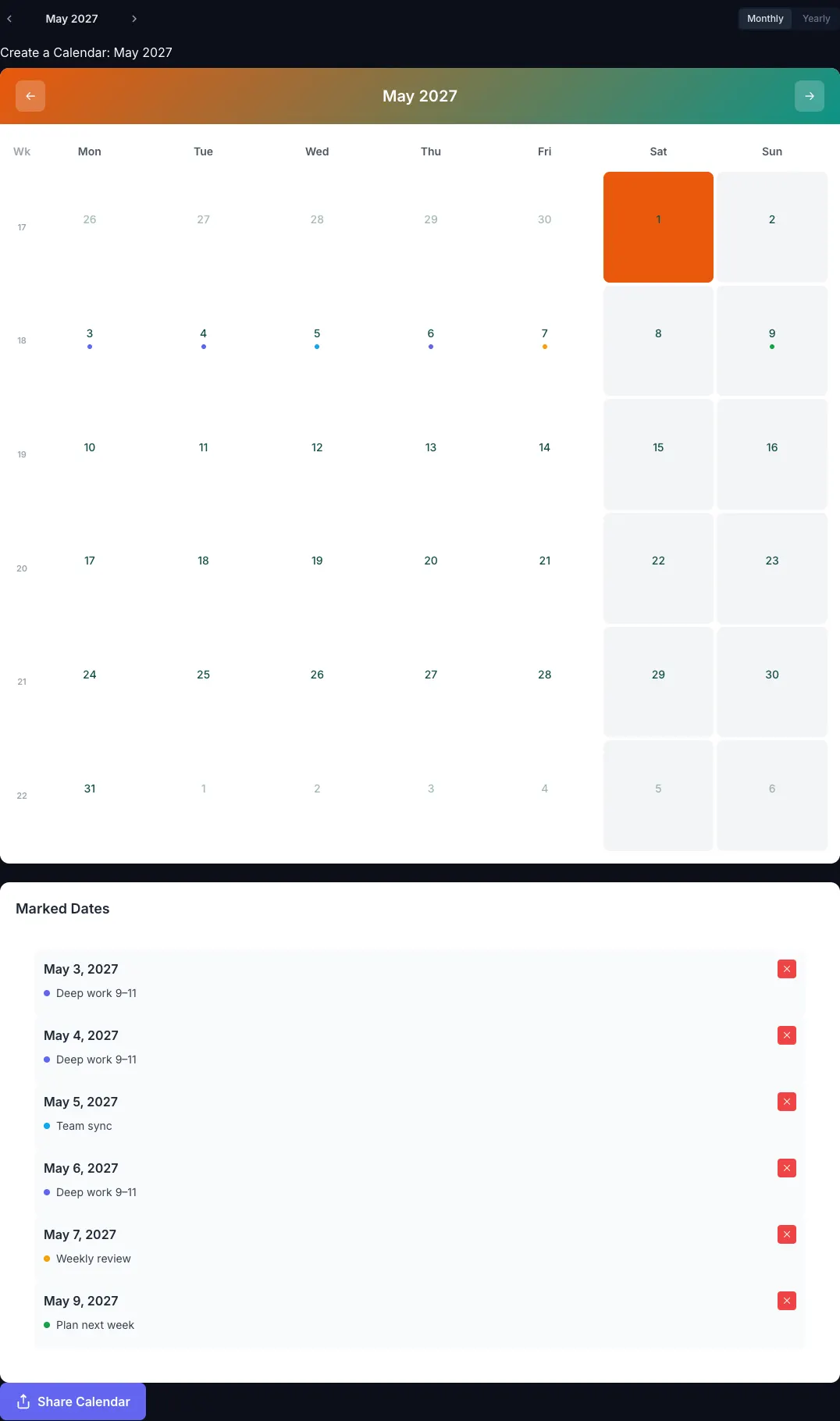
- **Deep work blocks:** 90 minutes to 3 hours of focused, demanding work, ideally at your peak energy time.
- **Shallow work blocks:** email, admin and quick tasks batched into one or two slots a day.
- **Meeting blocks:** meetings grouped on certain days or afternoons so they don't fragment the rest.
- **Buffer blocks:** open time for overruns and surprises.
- **Theme days:** a whole day for one area, such as Monday for planning and Friday for review.
## **How do you create a weekly planning system?**
Build it in this order. Each part takes minutes, not hours.
### **List your fixed commitments**
Start with what cannot move: meetings, classes, appointments, school runs, shifts and hard deadlines. Put them on the calendar first; they are the skeleton of the week.
### **Choose three weekly priorities**
Pick the three outcomes that would make the week a success. Each should advance a bigger goal, such as a section of a report that is part of this quarter's project. Our [goal setting calendar guide](https://calendarbest.com/blog/calendar-goal-setting) shows how to break yearly goals down to this level.
Three is a deliberate limit. Most people overestimate what fits into a week, and a short list forces an honest choice.
### **Block time for each priority**
Give each priority one or more deep work blocks before anything else fills the gaps. Label them clearly, for example "Deep work 9 to 11: budget draft", so the purpose is visible to you and anyone looking at your calendar.
Protect your best hours. If you focus best in the morning, keep mornings for deep work and push meetings to the afternoon.
### **Batch the small stuff and leave buffers**
Group email, calls and admin into fixed slots instead of scattering them. Then leave 15 to 30 minutes between back-to-back commitments and at least one open block per day for overruns.
A week planned to the minute breaks the first time something runs late.
### **Schedule the weekly review**
The weekly review is what makes this a system rather than a one-off plan. It is a core habit of David Allen's [Getting Things Done](https://en.wikipedia.org/wiki/Getting_Things_Done) method, and it takes 20 to 30 minutes.
Put it on the calendar as a recurring commitment, for example Friday at 4 pm or Sunday evening.
## **What should a weekly review include?**
Ask the same questions every week:
- Did I finish my three priorities? If not, why?
- Which time blocks held, and which were taken over?
- What carries over to next week?
- What fixed commitments are coming up?
- What are next week's three priorities?
Then block next week's time before you close the calendar. After a month of reviews, you will know your real capacity, and your plans will get more accurate.
## **What is a good weekly planning routine?**
A simple routine that most people can keep:
1. **Sunday or Monday (20 to 30 minutes):** review last week, choose three priorities, block time.
2. **Each morning (5 minutes):** check today's blocks and adjust for anything new.
3. **Friday afternoon (15 minutes):** note what got done and what moves to next week.
If a block keeps getting invaded, shrink it to what you can actually protect. A plan you follow beats an ideal plan you abandon.
## **Common weekly planning mistakes**
- **Planning every hour.** No buffer means one overrun wrecks the day.
- **Listing tasks instead of outcomes.** "Answer emails" is activity; "send the proposal" is progress.
- **Skipping the review.** Without it, the same problems repeat each week.
- **Ignoring energy.** Hard work scheduled at your lowest energy time tends to slip.
- **Forgetting rest.** Exercise, family time and breaks need blocks too.
## **How to plan your week on a printed monthly calendar**
CalendarBest exports monthly and yearly calendars, not week-per-page planners. A monthly grid still works well for weekly planning, because every row is one week and you can see the next four or five weeks together.
Here is how we set it up in the [calendar builder](https://calendarbest.com/builder):
1. Under Calendar settings, set the week to start on Monday and turn on Show week numbers, so each row carries its ISO week.
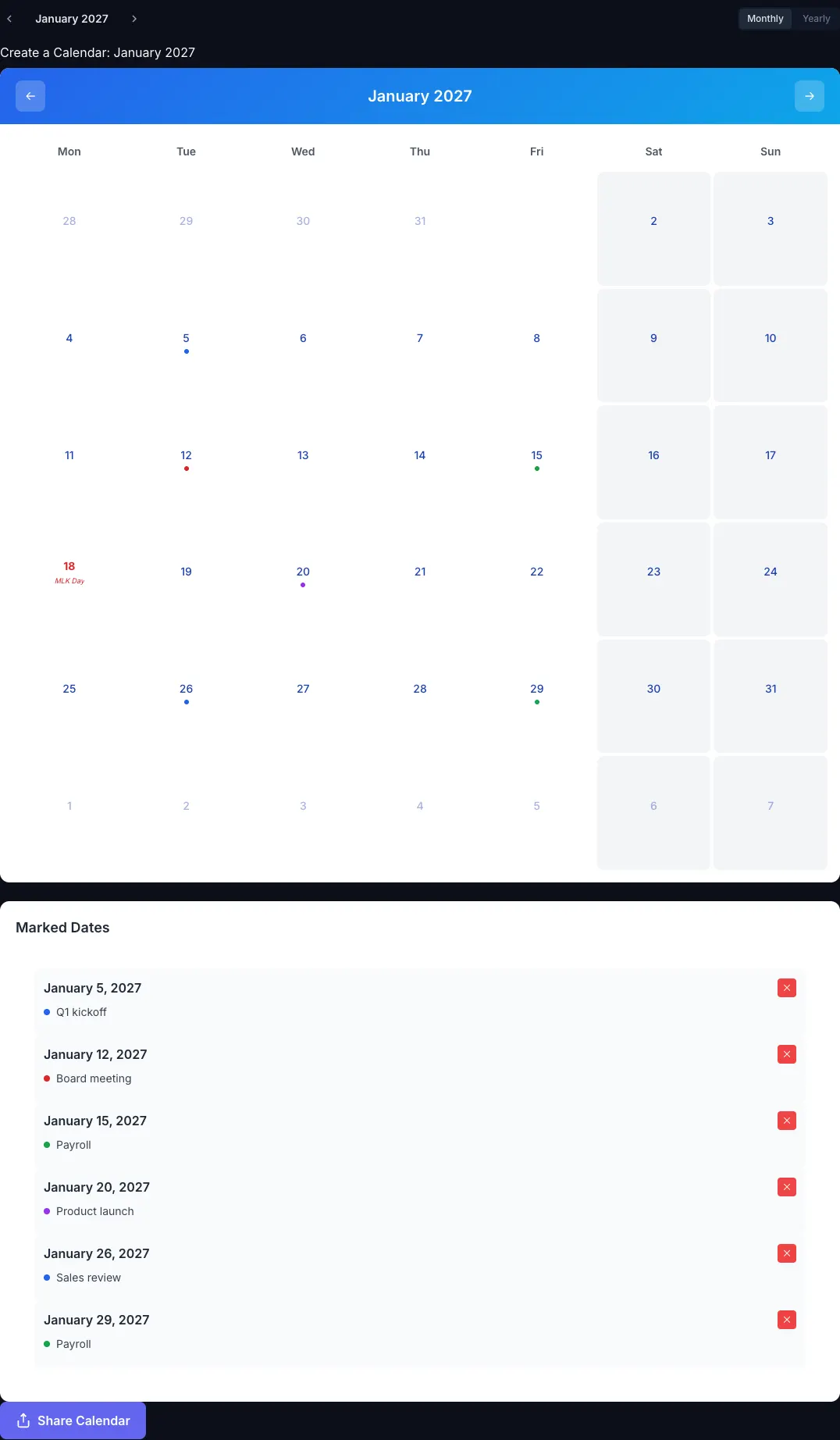
2. Click a date to add each fixed commitment and recurring time block as an event, such as "Deep work 9 to 11" or "Team sync", with one color per block type.
3. Add your weekly review as an event on the same day each week.
4. Export the current month as a PDF on A4 or Letter and keep it on your desk.
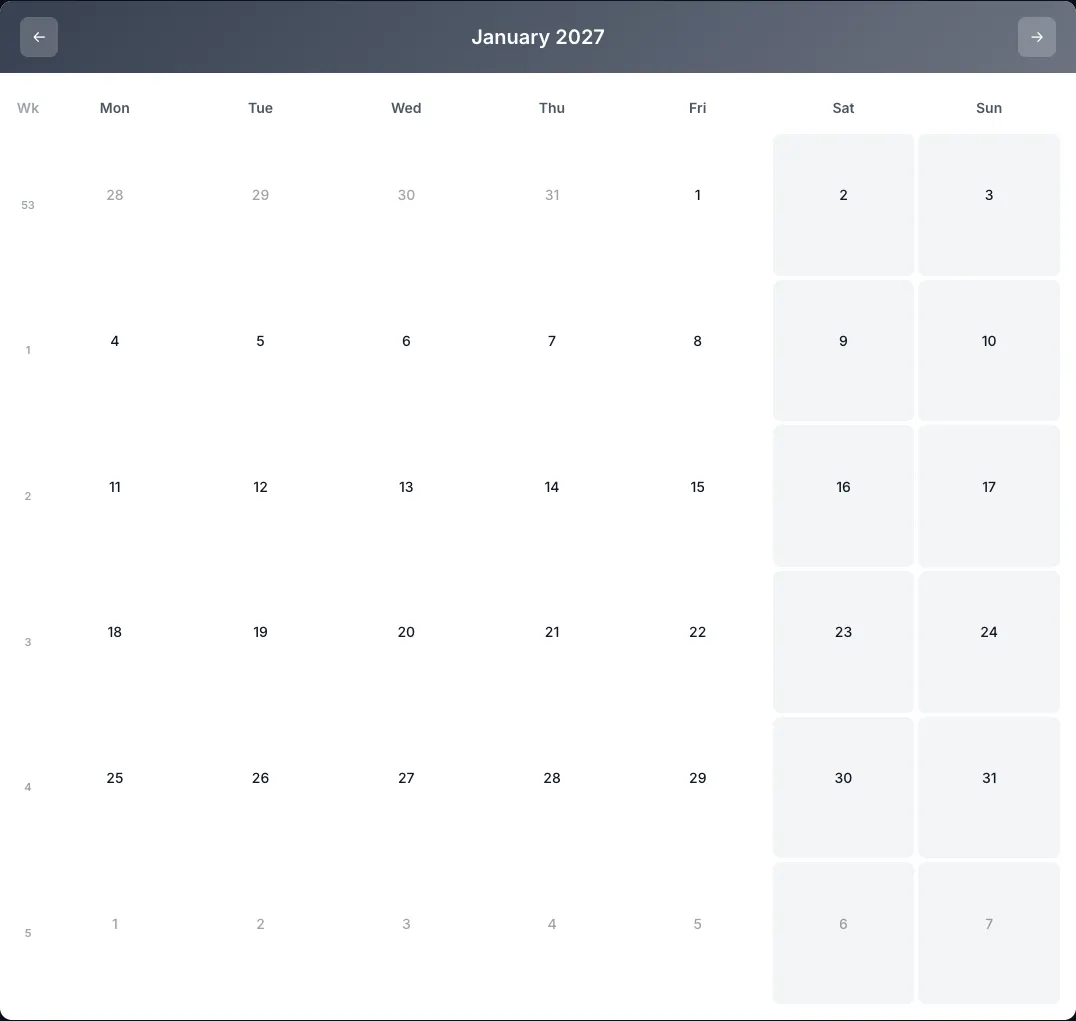
Each event is added individually, so this works best for a handful of blocks per week. For hour-by-hour scheduling, keep the detail in your digital calendar and use the printed month for priorities and reviews.
Our [weekly calendar templates](https://calendarbest.com/templates/weekly) are high-contrast designs chosen for this kind of week-by-week use. If you also want to track routines alongside your weekly plan, see our guide to [using a habit tracker calendar](https://calendarbest.com/blog/how-to-track-habits-with-a-calendar).
## **Frequently asked questions**
Time blocking is a time management technique where you divide your day or week into blocks and assign each block to one task or type of work. Your calendar then shows when each piece of work will happen, not just your meetings.
Once a week, list your fixed commitments, choose three priorities for the week and block time for each one. Add a short daily check and a weekly review to keep the plan accurate.
About 20 to 30 minutes for the weekly session, five minutes each morning and around 15 minutes for a Friday review.
Time blocking reserves a calendar slot for a task. Timeboxing sets a fixed time limit to finish it, a practice from project management; the two are often combined.
No. CalendarBest exports monthly and yearly calendars, not week-per-page planners. You can plan weekly on a monthly grid with ISO week numbers, where each row is one week.
[Back to Blog](https://calendarbest.com/blog)
## **You Might Also Like**
[**Time Blocking: How to Plan Your Day in Blocks, on Paper or Screen**
Time blocking means giving every hour of your workday a job in advance. How to set it up, a sample day, the printable method, and the mistakes that sink it.Oct 27, 20266 min read](https://calendarbest.com/blog/time-blocking) [**Best Calendar Apps in 2026: Which One Fits How You Plan?**
The best calendar apps of 2026 by use case: free picks, paid upgrades, booking and privacy tools, plus how to print any month or year as a free PDF, no signup.Jan 15, 20265 min read](https://calendarbest.com/blog/best-calendar-apps-tools-2026) [**Year Planner: How to Plan Your Year with a Calendar**
Plan your year with a free year planner: fixed dates, 3 goals, quarterly milestones. Includes real 2027 working days and long weekends, plus a free PDF export.Jun 1, 20265 min read](https://calendarbest.com/blog/how-to-plan-your-year-with-a-calendar)
## **Create your own calendar**
Design and export custom calendars in minutes. No account required.
[**Open Calendar Builder **](https://calendarbest.com/builder)
```json
{"@context":"https://schema.org","@type":"FAQPage","mainEntity":[{"@type":"Question","name":"What is time blocking?","acceptedAnswer":{"@type":"Answer","text":"Time blocking is a time management technique where you divide your day or week into blocks and assign each block to one task or type of work. Your calendar then shows when each piece of work will happen, not just your meetings."}},{"@type":"Question","name":"How do I start weekly planning?","acceptedAnswer":{"@type":"Answer","text":"Once a week, list your fixed commitments, choose three priorities for the week and block time for each one. Add a short daily check and a weekly review to keep the plan accurate."}},{"@type":"Question","name":"How long should weekly planning take?","acceptedAnswer":{"@type":"Answer","text":"About 20 to 30 minutes for the weekly session, five minutes each morning and around 15 minutes for a Friday review."}},{"@type":"Question","name":"What is the difference between time blocking and timeboxing?","acceptedAnswer":{"@type":"Answer","text":"Time blocking reserves a calendar slot for a task. Timeboxing sets a fixed time limit to finish it, a practice from project management; the two are often combined."}},{"@type":"Question","name":"Does CalendarBest have a weekly planner layout?","acceptedAnswer":{"@type":"Answer","text":"No. CalendarBest exports monthly and yearly calendars, not week-per-page planners. You can plan weekly on a monthly grid with ISO week numbers, where each row is one week."}}]}
```
```json
{"@context":"https://schema.org","@graph":[{"@id":"https://calendarbest.com/#website","@type":"WebSite","description":"Free calendar-to-PDF generator with a visual builder. Design monthly or yearly calendar layouts and export high-quality PDFs.","inLanguage":"en","name":"CalendarBest","url":"https://calendarbest.com/","potentialAction":[{"@type":"SearchAction","target":{"@type":"EntryPoint","urlTemplate":"https://calendarbest.com/builder?q={search_term_string}"},"query-input":{"@type":"PropertyValueSpecification","valueRequired":true,"valueName":"search_term_string"}}],"publisher":{"@id":"https://calendarbest.com/#/schema/organization/1"},"workTranslation":[{"@id":"https://calendarbest.com/de#website"},{"@id":"https://calendarbest.com/fr#website"},{"@id":"https://calendarbest.com/es#website"},{"@id":"https://calendarbest.com/it#website"},{"@id":"https://calendarbest.com/pt#website"}]},{"@id":"https://calendarbest.com/blog/how-to-create-weekly-planning-system#webpage","@type":"WebPage","dateModified":"2026-10-28","datePublished":"2026-07-08","description":"Weekly planning made simple: a 30-minute routine, three priorities and time blocking, explained. Then plan each week on a free printable monthly calendar PDF.","name":"Weekly Planning Guide: Time Blocking System","url":"https://calendarbest.com/blog/how-to-create-weekly-planning-system","breadcrumb":{"@id":"https://calendarbest.com/blog/how-to-create-weekly-planning-system#breadcrumb"},"isPartOf":{"@id":"https://calendarbest.com/#website"},"potentialAction":[{"@type":"ReadAction","target":["https://calendarbest.com/blog/how-to-create-weekly-planning-system"]}],"primaryImageOfPage":{"@id":"https://calendarbest.com/#logo"}},{"@id":"https://calendarbest.com/#identity","@type":"Organization","description":"Free calendar-to-PDF generator with a visual builder. Design monthly or yearly calendar layouts and export high-quality PDFs.","name":"CalendarBest","url":"https://calendarbest.com","logo":{"@id":"https://calendarbest.com/#logo"}},{"@id":"https://calendarbest.com/blog/how-to-create-weekly-planning-system#/schema/software-application/1","@type":"SoftwareApplication","applicationCategory":"DesignApplication","name":"CalendarBest","operatingSystem":"Web","offers":{"@type":"Offer","availability":"https://schema.org/InStock","price":0,"priceCurrency":"USD","priceValidUntil":"2027-12-30T00:00:00.000Z"}},{"@id":"https://calendarbest.com/blog/how-to-create-weekly-planning-system#article","@type":"Article","dateModified":"2026-10-28","datePublished":"2026-07-08","description":"Weekly planning made simple: a 30-minute routine, three priorities and time blocking, explained. Then plan each week on a free printable monthly calendar PDF.","headline":"Weekly Planning: How to Build a System with Time Blocking","inLanguage":"en","thumbnailUrl":"https://calendarbest.com/og-image.png","author":{"@id":"https://calendarbest.com/#/schema/organization/1"},"image":{"@id":"https://calendarbest.com/#/schema/image/1"},"isPartOf":{"@id":"https://calendarbest.com/blog/how-to-create-weekly-planning-system#webpage"},"mainEntityOfPage":{"@id":"https://calendarbest.com/blog/how-to-create-weekly-planning-system#webpage"},"publisher":{"@id":"https://calendarbest.com/#identity"}},{"@id":"https://calendarbest.com/blog/how-to-create-weekly-planning-system#breadcrumb","@type":"BreadcrumbList","itemListElement":[{"@type":"ListItem","name":"Home","item":"https://calendarbest.com","position":1},{"@type":"ListItem","name":"Blog","item":"https://calendarbest.com/blog","position":2},{"@type":"ListItem","name":"Weekly Planning: How to Build a System with Time Blocking","position":3}]},{"@id":"https://calendarbest.com/#/schema/organization/1","@type":"Organization","name":"CalendarBest Team","url":"https://calendarbest.com/about"},{"@id":"https://calendarbest.com/#logo","@type":"ImageObject","caption":"CalendarBest","contentUrl":"https://calendarbest.com/logo.png","inLanguage":"en","url":"https://calendarbest.com/logo.png"},{"@id":"https://calendarbest.com/#/schema/image/1","@type":"ImageObject","contentUrl":"https://calendarbest.com/og-image.png","inLanguage":"en","url":"https://calendarbest.com/og-image.png"}]}
```
## Sitemap
See the full [sitemap](https://calendarbest.com/sitemap.md) for all pages.