---
title: "Best Productivity Apps That Sync With Calendar"
description: "Productivity apps that sync with calendar tools, sorted by sync direction (two-way or read-only), plus a free printable calendar for the overview. No signup."
canonical_url: "https://calendarbest.com/blog/best-productivity-apps-sync-calendars"
last_updated: 2026-10-28
locale: en
meta:
"og:description": "Productivity apps that sync with calendar tools, sorted by sync direction (two-way or read-only), plus a free printable calendar for the overview. No signup."
"og:image": "https://calendarbest.com/og-image.png"
"og:image:height": "630"
"og:image:type": image/png
"og:image:width": "1200"
"og:title": "Productivity Apps That Sync With Your Calendar: Picks by Category"
"twitter:description": "Productivity apps that sync with calendar tools, sorted by sync direction (two-way or read-only), plus a free printable calendar for the overview. No signup."
"twitter:image": "https://calendarbest.com/og-image.png"
"twitter:title": "Productivity Apps That Sync With Your Calendar: Picks by Category"
---
> Index of every page on this site: [llms.txt](https://calendarbest.com/llms.txt)
[**Productivity**](https://calendarbest.com/blog)
# **Productivity Apps That Sync With Your Calendar: Picks by Category**
Productivity apps that sync with calendar tools, sorted by sync direction (two-way or read-only), plus a free printable calendar for the overview. No signup.
July 15, 20264 min readBy CalendarBest Team
productivity appscalendar synctask managementtime management
The productivity apps that sync with calendar tools most reliably are Todoist, Notion with Notion Calendar, Things 3, TickTick, Toggl Track and Reclaim. The detail that matters is direction: some apps write tasks into your calendar and read changes back, while others only show your events or publish a read-only feed.
Below we sort them by job and note which calendars each one supports. We build CalendarBest, a printable calendar maker, and none of these apps pays us; the last section explains where a printed calendar fits in.
## **What does "sync with your calendar" actually mean?**
App listings use "calendar integration" for very different features. Before you choose, check which of these two kinds you are getting.
### **Two-way sync**
With two-way sync, a task with a date shows up as an event, and moving the event in your calendar reschedules the task. This is the most useful kind, but it can create duplicates if you also run older connections through automation tools.
### **One-way display or a read-only feed**
Many apps only show your calendar events inside their own view, or publish an [iCalendar](https://en.wikipedia.org/wiki/ICalendar) feed your calendar subscribes to. Subscribed feeds are read-only and refresh on a schedule, so changes can take hours to appear.
## **Which task managers sync with your calendar?**
Task managers benefit most from calendar sync, because a task without a time slot tends to slide.
### **Todoist**
[Todoist](https://en.wikipedia.org/wiki/Todoist) offers a two-way integration with Google Calendar, and since June 2025 an Outlook Calendar integration where rescheduling a task in Outlook updates it in Todoist. You can connect Google or Outlook, but not both at the same time.
Doist recommends turning off older IFTTT or Zapier calendar connections first, because running both causes duplicate tasks.
### **TickTick**
TickTick has its own calendar view for tasks, so many people use it as task list and planner in one. Subscribing to outside calendars inside TickTick is a Premium feature.
Reports differ on how live the connection to Google Calendar is, so test it with a few tasks before you rely on it.
### **Things 3**
Things 3 runs only on Apple devices. It shows events from Apple Calendar, including any Google or Exchange accounts added there, in its Today and Upcoming lists.
Those events are read-only in Things, and tasks are not written back to your calendar. It suits people who want to see meetings while planning, not a full sync.
## **Which notes and workspace apps integrate with a calendar?**
Notes apps rarely need full sync. Seeing the day's meetings next to your notes is usually enough.
### **Notion and Notion Calendar**
Notion itself has no built-in sync with Google Calendar or Outlook. Its free companion, Notion Calendar, shows dates from Notion databases next to events from Google Calendar, Outlook and iCloud accounts.
External events stay in their own calendar rather than becoming Notion pages. For true database sync you need a third-party tool.
### **Obsidian**
Obsidian has no official calendar sync. Community plugins add calendar views and can read .ics feeds, which works well for daily notes but takes some setup.
## **Which communication tools connect to your calendar?**
Chat tools connect to your calendar mainly to cut interruptions and to create meetings.
### **Slack**
The Google Calendar and Outlook Calendar apps for Slack send event reminders and can set your status while you are in a meeting. That status tells colleagues you are busy without you typing anything.
### **Microsoft Teams**
Teams is tied to Outlook through Microsoft 365. Meetings scheduled in Teams appear in your Outlook calendar, and the Teams calendar shows the same events.
## **Which time tracking and auto-scheduling apps use your calendar?**
These apps read your calendar to measure or protect your time.
### **Toggl Track**
Toggl Track connects to Google and Outlook calendars and shows your events next to your time entries in its calendar view. It can also create time entries automatically from calendar events, which saves logging meetings by hand.
### **Reclaim**
Reclaim, acquired by Dropbox in 2024, finds free slots in your calendar and books tasks, habits and focus time into them. When a meeting moves, it reshuffles the blocks. It started as a Google Calendar tool, so confirm support for your provider first.
## **How to build a calendar-centered productivity stack**
A good stack is small. One calendar, one task manager and one note tool cover most people.
1. Choose one main calendar, usually the one your work email uses. Our comparison of the [best calendar apps](https://calendarbest.com/blog/best-calendar-apps-tools-2026) helps if you are unsure.
2. Pick a task manager whose sync direction fits: two-way if you plan by dragging tasks around, read-only if you only need to see meetings.
3. Turn off old automations before you connect a new integration, so nothing is created twice.
4. Protect focus with [time blocking](https://en.wikipedia.org/wiki/Time_blocking), by hand or with an auto-scheduler. Our [weekly planning system guide](https://calendarbest.com/blog/how-to-create-weekly-planning-system) shows a simple routine.
5. Review once a week and move anything that slipped.
## **Where a printed calendar fits in your workflow**
Synced apps are great at the next hour and the next day. They are weak at showing a whole quarter or year, which is where deadlines, [holidays](https://calendarbest.com/holidays) and launches collide.
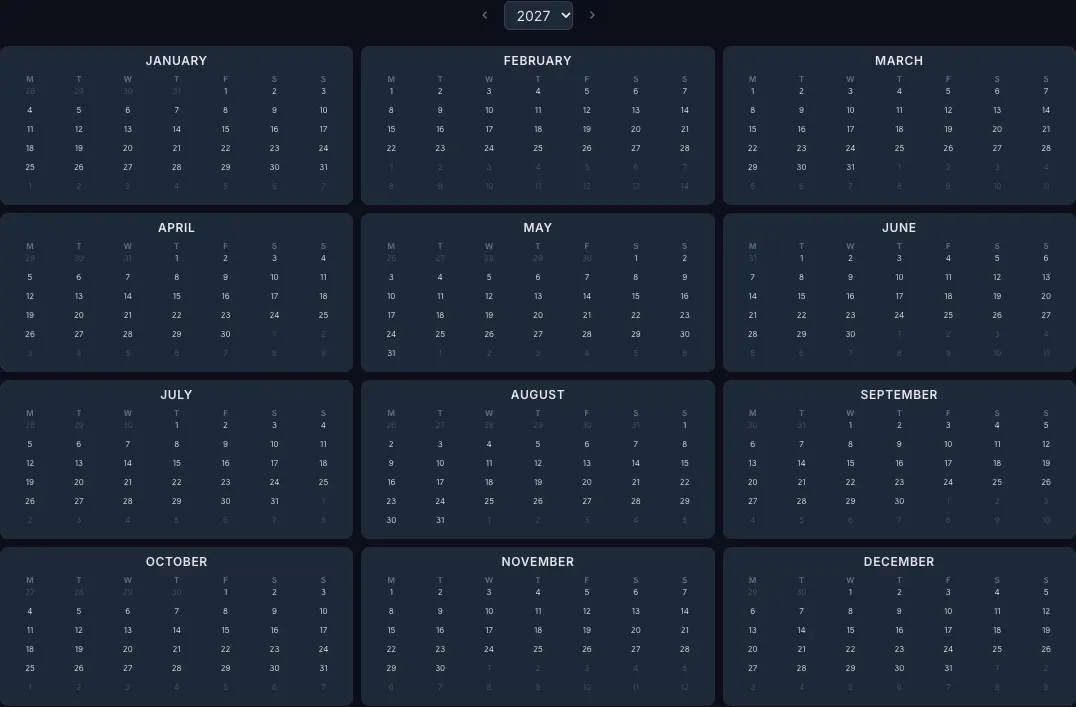
CalendarBest covers that view. The [free online calendar maker](https://calendarbest.com/builder) runs in your browser with no account: add color-coded events and notes to any date, show public holidays for 11 countries and turn on ISO week numbers. Your design stays in your browser and nothing is uploaded.
Export the current month, a full year as 12 pages starting in any month, or the whole year on one page, on A4, Letter or A3. It is a planning overview, not a sync tool, so key dates are added by hand. Our [goal setting calendar guide](https://calendarbest.com/blog/calendar-goal-setting) shows how to use that yearly overview for milestones.
## **Frequently asked questions**
Todoist has a two-way Google Calendar integration, so dated tasks appear as events and rescheduling them in the calendar updates the task. TickTick can also connect, but some calendar features need Premium.
Notion itself does not sync with Google Calendar. Notion Calendar, its free companion app, shows Google Calendar events next to dates from Notion databases, but those events do not become Notion pages.
Sync is two-way: changes in either app update the other. A subscription is a read-only .ics feed that your calendar refreshes on a schedule, so edits only flow one way and can lag.
Things 3 shows events from calendars added to Apple Calendar, which can include Google accounts. The events are read-only in Things, and tasks are not written back to the calendar.
[Back to Blog](https://calendarbest.com/blog)
## **You Might Also Like**
[**Best Calendar Apps in 2026: Which One Fits How You Plan?**
The best calendar apps of 2026 by use case: free picks, paid upgrades, booking and privacy tools, plus how to print any month or year as a free PDF, no signup.Jan 15, 20265 min read](https://calendarbest.com/blog/best-calendar-apps-tools-2026) [**Year Planner: How to Plan Your Year with a Calendar**
Plan your year with a free year planner: fixed dates, 3 goals, quarterly milestones. Includes real 2027 working days and long weekends, plus a free PDF export.Jun 1, 20265 min read](https://calendarbest.com/blog/how-to-plan-your-year-with-a-calendar) [**Weekly Planning: How to Build a System with Time Blocking**
Weekly planning made simple: a 30-minute routine, three priorities and time blocking, explained. Then plan each week on a free printable monthly calendar PDF.Jul 8, 20265 min read](https://calendarbest.com/blog/how-to-create-weekly-planning-system)
## **Create your own calendar**
Design and export custom calendars in minutes. No account required.
[**Open Calendar Builder **](https://calendarbest.com/builder)
```json
{"@context":"https://schema.org","@type":"FAQPage","mainEntity":[{"@type":"Question","name":"Which to-do list app syncs with Google Calendar?","acceptedAnswer":{"@type":"Answer","text":"Todoist has a two-way Google Calendar integration, so dated tasks appear as events and rescheduling them in the calendar updates the task. TickTick can also connect, but some calendar features need Premium."}},{"@type":"Question","name":"Does Notion sync with Google Calendar?","acceptedAnswer":{"@type":"Answer","text":"Notion itself does not sync with Google Calendar. Notion Calendar, its free companion app, shows Google Calendar events next to dates from Notion databases, but those events do not become Notion pages."}},{"@type":"Question","name":"What is the difference between calendar sync and a calendar subscription?","acceptedAnswer":{"@type":"Answer","text":"Sync is two-way: changes in either app update the other. A subscription is a read-only .ics feed that your calendar refreshes on a schedule, so edits only flow one way and can lag."}},{"@type":"Question","name":"Does Things 3 sync with Google Calendar?","acceptedAnswer":{"@type":"Answer","text":"Things 3 shows events from calendars added to Apple Calendar, which can include Google accounts. The events are read-only in Things, and tasks are not written back to the calendar."}}]}
```
```json
{"@context":"https://schema.org","@graph":[{"@id":"https://calendarbest.com/#website","@type":"WebSite","description":"Free calendar-to-PDF generator with a visual builder. Design monthly or yearly calendar layouts and export high-quality PDFs.","inLanguage":"en","name":"CalendarBest","url":"https://calendarbest.com/","potentialAction":[{"@type":"SearchAction","target":{"@type":"EntryPoint","urlTemplate":"https://calendarbest.com/builder?q={search_term_string}"},"query-input":{"@type":"PropertyValueSpecification","valueRequired":true,"valueName":"search_term_string"}}],"publisher":{"@id":"https://calendarbest.com/#/schema/organization/1"},"workTranslation":[{"@id":"https://calendarbest.com/de#website"},{"@id":"https://calendarbest.com/fr#website"},{"@id":"https://calendarbest.com/es#website"},{"@id":"https://calendarbest.com/it#website"},{"@id":"https://calendarbest.com/pt#website"}]},{"@id":"https://calendarbest.com/blog/best-productivity-apps-sync-calendars#webpage","@type":"WebPage","dateModified":"2026-10-28","datePublished":"2026-07-15","description":"Productivity apps that sync with calendar tools, sorted by sync direction (two-way or read-only), plus a free printable calendar for the overview. No signup.","name":"Best Productivity Apps That Sync With Calendar","url":"https://calendarbest.com/blog/best-productivity-apps-sync-calendars","breadcrumb":{"@id":"https://calendarbest.com/blog/best-productivity-apps-sync-calendars#breadcrumb"},"isPartOf":{"@id":"https://calendarbest.com/#website"},"potentialAction":[{"@type":"ReadAction","target":["https://calendarbest.com/blog/best-productivity-apps-sync-calendars"]}],"primaryImageOfPage":{"@id":"https://calendarbest.com/#logo"}},{"@id":"https://calendarbest.com/#identity","@type":"Organization","description":"Free calendar-to-PDF generator with a visual builder. Design monthly or yearly calendar layouts and export high-quality PDFs.","name":"CalendarBest","url":"https://calendarbest.com","logo":{"@id":"https://calendarbest.com/#logo"}},{"@id":"https://calendarbest.com/blog/best-productivity-apps-sync-calendars#/schema/software-application/1","@type":"SoftwareApplication","applicationCategory":"DesignApplication","name":"CalendarBest","operatingSystem":"Web","offers":{"@type":"Offer","availability":"https://schema.org/InStock","price":0,"priceCurrency":"USD","priceValidUntil":"2027-12-30T00:00:00.000Z"}},{"@id":"https://calendarbest.com/blog/best-productivity-apps-sync-calendars#article","@type":"Article","dateModified":"2026-10-28","datePublished":"2026-07-15","description":"Productivity apps that sync with calendar tools, sorted by sync direction (two-way or read-only), plus a free printable calendar for the overview. No signup.","headline":"Productivity Apps That Sync With Your Calendar: Picks by Category","inLanguage":"en","thumbnailUrl":"https://calendarbest.com/og-image.png","author":{"@id":"https://calendarbest.com/#/schema/organization/1"},"image":{"@id":"https://calendarbest.com/#/schema/image/1"},"isPartOf":{"@id":"https://calendarbest.com/blog/best-productivity-apps-sync-calendars#webpage"},"mainEntityOfPage":{"@id":"https://calendarbest.com/blog/best-productivity-apps-sync-calendars#webpage"},"publisher":{"@id":"https://calendarbest.com/#identity"}},{"@id":"https://calendarbest.com/blog/best-productivity-apps-sync-calendars#breadcrumb","@type":"BreadcrumbList","itemListElement":[{"@type":"ListItem","name":"Home","item":"https://calendarbest.com","position":1},{"@type":"ListItem","name":"Blog","item":"https://calendarbest.com/blog","position":2},{"@type":"ListItem","name":"Productivity Apps That Sync With Your Calendar: Picks by Category","position":3}]},{"@id":"https://calendarbest.com/#/schema/organization/1","@type":"Organization","name":"CalendarBest Team","url":"https://calendarbest.com/about"},{"@id":"https://calendarbest.com/#logo","@type":"ImageObject","caption":"CalendarBest","contentUrl":"https://calendarbest.com/logo.png","inLanguage":"en","url":"https://calendarbest.com/logo.png"},{"@id":"https://calendarbest.com/#/schema/image/1","@type":"ImageObject","contentUrl":"https://calendarbest.com/og-image.png","inLanguage":"en","url":"https://calendarbest.com/og-image.png"}]}
```
## Sitemap
See the full [sitemap](https://calendarbest.com/sitemap.md) for all pages.